

SOC 2 Vulnerability management compliance is less about being perfectly secure and more about proving you are diligent.
When an auditor looks at your vulnerability management program, they are not expecting zero vulnerabilities.
Software is complex, and new flaws are discovered daily. SOC2 auditors are looking for a mature, repeatable process that finds flaws, assesses their risk, and fixes them within a reasonable timeframe.
Vulnerability management sits primarily under the Common Criteria (CC) section of the SOC 2 framework, specifically CC7.1. This criterion requires that the entity use detection and monitoring procedures to identify changes to configurations that result in the introduction of new vulnerabilities.
This guide details how to build a program that satisfies SOC 2 Type II requirements while actually improving your security posture.
Introduction to SOC 2 Compliance
SOC 2 compliance is a cornerstone for organizations aiming to prove their commitment to security and trust in today’s digital landscape. Achieving SOC 2 means demonstrating that your systems and processes are designed to safeguard data, ensure availability, and maintain processing integrity, confidentiality, and privacy.
Central to this is a robust vulnerability management program: one that systematically identifies, assesses, and remediates security vulnerabilities before they can be exploited. Regular vulnerability scans are not just a checkbox; they are essential for detecting vulnerabilities early and reducing the risk of data breaches.
Undergoing an independent audit as part of SOC 2 compliance provides external validation that your controls are effective and your security posture is strong. By prioritizing vulnerability management, organizations can confidently assure customers and stakeholders that their data is protected and that security is woven into the fabric of their operations.
The Core Vulnerability Management Lifecycle
A static list of bugs is not a vulnerability management program. SOC 2 requires a lifecycle. You must demonstrate that data flows through your system in a loop: the process begins by identifying vulnerabilities, finds flaws, assesses their risk, and fixes them within a reasonable timeframe.
1. Asset Inventory
You cannot secure what you do not know exists. Before you run a single scan, you need a definitive source of truth for your assets. This includes:
- Production servers (EC2, virtual machines)
- Database instances
- Load balancers
- Container images
- Code repositories
- Employee workstations
Critical assets,such as production servers and databases, require special attention during vulnerability scanning to prevent security gaps and ensure compliance.
If a scanner finds a vulnerability on an IP address that does not exist in your inventory, you have a gap in asset management. If an asset exists in your inventory but is never scanned, you have a compliance violation.
2. Scanning and Identification
This is the automated discovery phase. For SOC 2, you generally need three distinct types of scanning coverage. A vulnerability scanner is used to detect vulnerabilities across various assets, including networks, servers, and applications.
Infrastructure Scanning: This covers the operating system and network layers. It looks for open ports, outdated Linux kernels, and missing patches on web servers like Nginx or Apache. Tools here include Nessus, Qualys, or Amazon Inspector. Regular scanning is essential to proactively detect vulnerabilities, and scanning frequency should be defined to ensure ongoing compliance with SOC 2 requirements.
Application Scanning (DAST): Dynamic Application Security Testing tools crawl your running web application. They try to inject SQL commands, execute cross-site scripting (XSS), and find misconfigurations in HTTP headers. This simulates what an external attacker sees. Regular scanning helps detect vulnerabilities in your applications and ensures continuous monitoring for new threats.
Dependency Scanning (SCA): Modern software is mostly open-source libraries glued together. Software Composition Analysis tools look at your package.json or requirements.txt files to see if you are importing libraries with known flaws. This is critical because auditors know that supply chain attacks are common. Regular scanning of dependencies helps detect vulnerabilities in third-party components and supports ongoing risk management.
3. Prioritization and Triage
This is where human intelligence applies context to raw data. A scanner might report a “Critical” vulnerability because a server is running an old version of a library. However, if that server is air-gapped and has no external access, the real risk might only be “Low.” When prioritizing vulnerabilities, it’s essential to consider business context, risk scoring (such as CVSS), and environmental factors, as these help ensure that remediation efforts are focused on issues that could have the most significant impact on your organization’s operations.
You need a formalized method for adjusting severity. Do not just rely on the Common Vulnerability Scoring System (CVSS) score. You should define logic for these adjustments in your policy.
Examples of valid prioritization logic:
- Exploitability: Is there a known public exploit code available?
- Exposure: Is the asset internet-facing or buried deep in a private subnet?
- Data classification: Does this asset process Customer PII or just marketing brochures?
- Risk appetite: How much risk is your organization willing to tolerate, and how does this influence remediation timelines and prioritization?
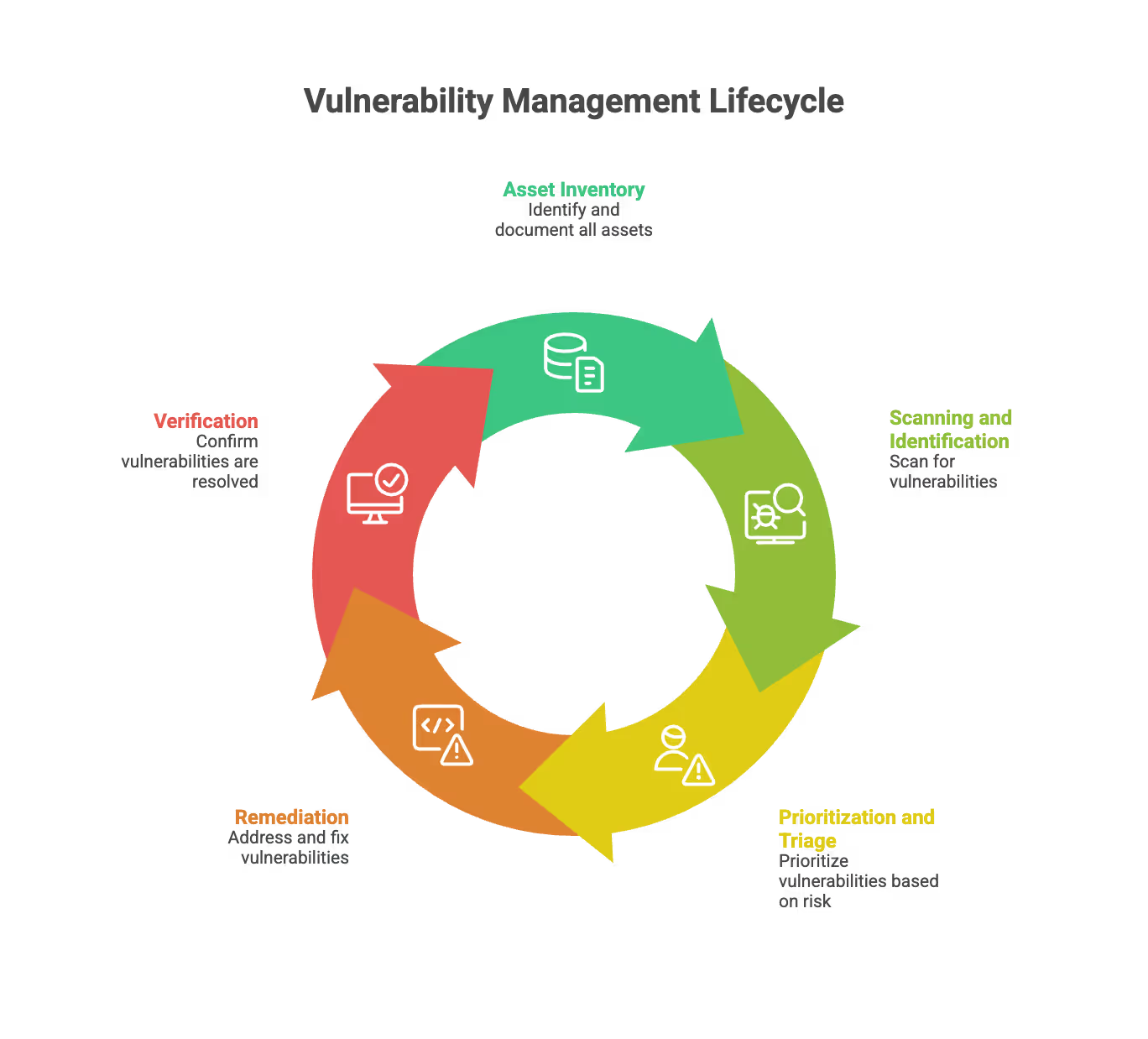
4. Remediation
This is the fix. Organizations must remediate vulnerabilities promptly, especially for critical issues, to prevent exploitation or data breaches. It usually involves applying a patch, changing a configuration, or rewriting code.
5. Verification
Once a fix is applied, you must rescan to confirm it worked. “I fixed it” is not evidence. A clean scan report dated after the remediation ticket is evidence. It is essential to review scan results to ensure that all vulnerabilities found during the initial assessment have been properly addressed and documented for SOC 2 compliance.
Required Controls for SOC 2 Trust Services Criteria
When designing your controls, you need to think about what the auditor will ask for as evidence. If you cannot produce a screenshot, a ticket, or a log to prove a control exists, then for the purpose of the audit, the control does not exist.
Here are the specific controls you should implement. These controls cover key areas required for SOC 2 compliance, such as security, availability, processing integrity, confidentiality, and privacy.
Control 1: Defined Service Level Agreements (SLAs)
You must have a policy that dictates how fast you fix things. If you do not write this down, the auditor will make up their own standard, which you might not like. Defined SLAs help ensure the organization can address issues in a timely and consistent manner, supporting effective vulnerability management and incident response.
A standard SLA structure looks like this:
- Critical Severity: Remediate within 3 to 5 Days.
- High Severity: Remediate within 14 to 30 days.
- Medium Severity: Remediate within 60 to 90 days.
- Low Severity: Fix on a best-effort basis or during the next scheduled maintenance.
Audit Tip: Do not set aggressive SLAs you cannot meet. It is better to have an SLA of 30 days for Highs and hit it 100% of the time than to have an SLA of 14 days and miss it half the time. Missed SLAs are exceptions in your report.
Control 2: Authenticated Scans
Running a scan from the outside looking in is useful, but it is insufficient. You need authenticated (credentialed) scans. This means providing the scanner with a set of read-only credentials so it can log into the server and look at the registry, the file system, and the patch levels.
Without authentication, a scanner might guess an operating system version based on TCP fingerprinting. With authentication, it knows exactly which kernel version is running. SOC 2 auditors prefer the accuracy of authenticated scans.
Control 3: Continuous vs. Quarterly Scanning
Historically, companies performed scans once every quarter. However, this approach can be challenging for cloud-native organizations, as new vulnerabilities emerge daily.
The modern standard:
- Continuous Scanning: Agents installed on servers continuously monitor systems to promptly identify and address vulnerabilities as they arise.
- CI/CD Integration: Container images are scanned every time a build occurs.
- Quarterly Reports: Even if you scan daily, you should generate a formal summary report every quarter to review with management.
Control 4: False Positive Management
Scanners are noisy. They will report things that are not actually problems. You need a control for handling these.
Do not just ignore them. You must mark them as “False Positive” in the tool and add a note explaining why. Providing a detailed description and detailed information about why a finding is a false positive helps auditors and stakeholders understand the rationale and supports effective incident response.
Good evidence for a false positive: “Scanner reports a vulnerability in OpenSSL version 1.1.1, but our security team has applied a custom patch that addresses the issue without changing the version number. See attached internal patch documentation and test results.”
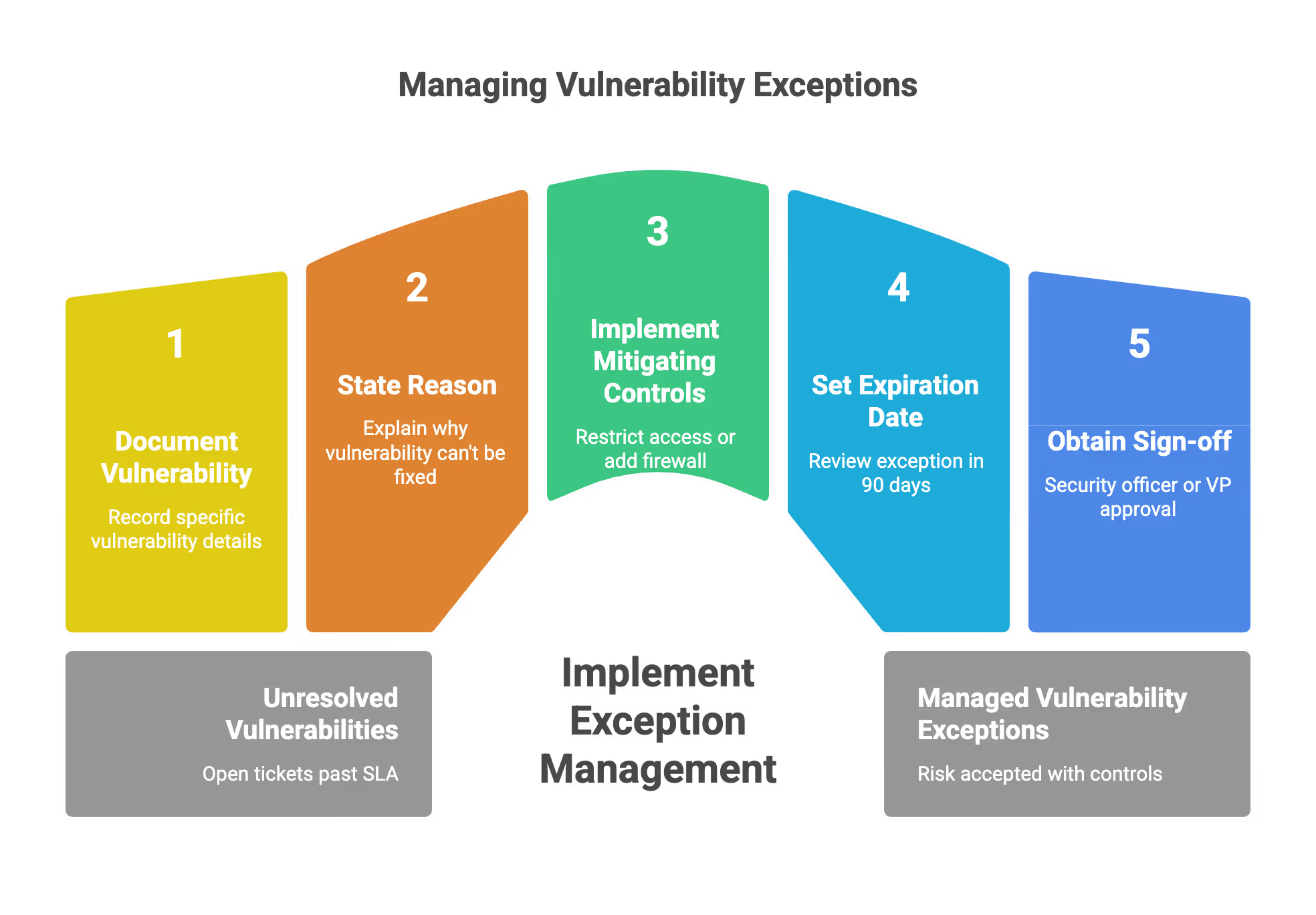
Control 5: Exception Management
Sometimes you cannot fix a vulnerability. Perhaps the patch breaks your application, or the vendor has not released a fix yet. In some cases, exceptions may be granted for vulnerabilities that are outside the limited scope of certain scans or controls, meaning they were not covered by the original assessment.
You cannot just leave the ticket open past the SLA. You must create a “Risk Acceptance” or “Exception.”
An exception record must contain:
- The specific vulnerability.
- The reason it cannot be fixed.
- The mitigating controls (e.g., “We cannot patch the server, but we restricted network access to it via a strict firewall rule”).
- A strict expiration date (e.g., review again in 90 days).
- Sign-off from a security officer or VP.
Penetration Testing vs. Vulnerability Scanning
There is often confusion between these two activities. SOC 2 usually requires both, but they serve different purposes.
Vulnerability Scanning
- Who: Automated software.
- What: Checks for known misconfigurations and missing patches. Vulnerability scanning is a critical component of maintaining network security by identifying misconfigurations and weaknesses.
- Frequency: Continuous, weekly, or monthly.
- Depth: Wide but shallow. It covers thousands of assets but does not chain attacks.
Penetration Testing
- Who: A human ethical hacker.
- What: Attempts to exploit logic errors and chain vulnerabilities to achieve a goal (like stealing a database).
- Frequency: Usually annual.
- Depth: Narrow but deep. Focuses on specific critical applications.
For SOC 2, you generally need an annual third-party penetration test. The auditor wants to see an independent set of eyes on your system.
Designing the Remediation Workflow
The biggest friction point in vulnerability management is the handoff between the Security Team (who finds the bugs) and the Engineering/DevOps Team (who fixes the bugs).
If you just email a PDF report to your developers, they will ignore it. It is 500 pages long and hard to read. You need to integrate into their workflow.
Integration Strategy
- Scanner runs. It identifies a vulnerability.
- Filter logic applies. Is it a False Positive? Is it already known?
- Ticket creation. The system automatically creates a Jira or Linear ticket.
- Assignment. The ticket goes to the backlog of the team that owns the asset.
- Context. The ticket includes the solution, not just the problem.
The "Golden Image" Approach
For cloud environments, patching live servers is an anti-pattern. If you have immutable infrastructure (like auto-scaling groups or Kubernetes clusters), you should not log into a server to run apt-get upgrade.
Instead, you fix the vulnerability in the source image (the Golden Image) or the Dockerfile. You rebuild the image, test it, and redeploy the environment. The old, vulnerable servers are terminated, and new, secure servers replace them.
This creates a clean audit trail. You show the auditor the pull request that updated the base image and the deployment log that rolled it out.
Metrics and Reporting
Auditors love meeting minutes. You should establish a quarterly Security Committee meeting where vulnerability trends are reviewed.
You should track and present these metrics:
Mean Time to Remediate (MTTR): How long does it take on average to close a ticket? If your SLA is 30 days, but your MTTR is 45 days, you have a process failure.
Vulnerability Age: Do you have “Low” severity vulnerabilities that have been open for three years? Even if they are low risk, having old data implies you have lost track of your estate.
Coverage Percentage: What percentage of your total assets are being scanned? If you have 100 servers and scans only cover 80, you have 20% blind spots.
These metrics are based on data collected from security tools and vulnerability management processes, ensuring accurate and actionable reporting.
Common Audit Pitfalls
When the auditor asks for your vulnerability evidence, avoid these common mistakes that lead to "exceptions" in your final report.
The "Just Trust Me" Gap
You claim you fix critical bugs in 24 hours. The auditor asks for a sample of 5 critical bugs from the last year. You provide the Jira tickets.
- Ticket 1: Created Jan 1, Closed Jan 2. (Pass)
- Ticket 2: Created Feb 1, Closed Feb 5. (Fail - missed SLA)
- Ticket 3: Created Mar 1, Closed Mar 2. (Pass)
If you miss the SLA, the ticket must have a documented reason or a formal exception linked to it. If it is just closed late with no comment, it is a control failure.
The Re-opened Ticket
Scanners often close a finding if they can't see the host, then re-open it when the host comes back online. This messes up your metrics. Ensure your ticketing system handles "resurfaced" vulnerabilities correctly so they do not look like new bugs every week.
The Authenticated Scan Failure
Often, the credentials used for scanning expire or change. The scanner continues to run but falls back to unauthenticated network scanning. The report looks green and clean because it can no longer see the missing patches inside the OS.
You must have a health check alerts that notify you if the scanner loses authentication. An auditor will notice if the number of findings drops from 100 to 5 overnight without a major deployment.
Tooling Categories
You do not need to buy the most expensive tools, but you need coverage in the right areas.
Network Scanners
These are the workhorses. Tenable (Nessus), Rapid7 (Nexpose), and Qualys are the industry standards. OpenVAS is a free, open-source alternative, though it requires more maintenance. Regularly applying software updates to these scanners is essential to ensure they can detect the latest vulnerabilities and provide accurate results.
Cloud Native Scanners
If you are entirely on AWS, Azure, or GCP, use their native tools. AWS Inspector and Amazon ECR (Elastic Container Registry) scanning are integrated and easy to pipe into evidence collection systems. Keeping these cloud-native scanners and related systems updated with the latest software updates is critical for addressing newly discovered vulnerabilities.
Code Scanners (SAST/SCA)
GitHub Dependabot, Snyk, and SonarQube are excellent for catching issues before they even reach production. Auditors look favorably on “Shift Left” strategies where you block vulnerabilities at the Pull Request stage.
Handling Zero-Day Events
Every so often, a massive vulnerability hits the news (like Log4Shell). Organizations must be prepared to respond rapidly to new threats and significant security events. SOC 2 auditors will often ask specifically how you handled these high-profile events.
You should have a “Emergency Response” mode for your vulnerability management program.
The Workflow:
- News breaks. Security team identifies the threat.
- Ad-hoc Scan. Do not wait for the nightly schedule. Run a targeted scan immediately for the specific signature.
- Triage. Determine impact.
- War Room. If confirmed, spin up a dedicated communication channel.
- Documentation. Keep a timeline of events. “10:00 AM: Identified threat. 10:15 AM: Scanned fleet. 11:00 AM: Patch applied to staging.”
This documentation is gold during an audit. It shows you are proactive, not just reactive.
Documentation Requirements Checklist
To prepare for the audit, ensure you have these documents ready in a folder: Documentation should include comprehensive vulnerability information, records of vulnerability reports, and policies that describe how you accept vulnerability reports from internal and external sources.
- Vulnerability Management Policy: The PDF that defines your SLAs, roles, and responsibilities, and outlines how you accept vulnerability reports.
- Asset Inventory: An export of your systems.
- Penetration Test Report: The executive summary (you do not need to share the technical details if you don’t want to, but the summary and proof of fix are required).
- Sample Scan Reports: A clean scan from each quarter.
- Evidence of Remediation: A sample of 5 to 10 Jira tickets showing bugs being fixed within SLA.
- Exception Log: A list of all accepted risks.
- Sensitive Information Protection: Ensure all documentation and reports safeguard sensitive information, maintaining confidentiality and compliance standards.
- Vulnerability Reports and Information: Include records of submitted vulnerability reports and any related vulnerability information shared or disclosed as part of your vulnerability management process.
Building Trust and Credibility
Trust is the foundation of any successful business relationship, and SOC 2 compliance is a powerful way to build and maintain that trust. By implementing regular vulnerability scans and penetration tests, organizations can proactively identify and address security weaknesses before they lead to security incidents.
This diligence demonstrates to customers, partners, and stakeholders that sensitive data, including customer data and employee data, is being handled with the utmost care.
A SOC 2 report serves as independent evidence that your organization’s controls are effective in managing vulnerabilities and protecting against threats.
This transparency not only helps prevent data breaches but also enhances your organization’s credibility in the marketplace, making it easier to win new business and retain existing clients.
Industry Best Practices
Adhering to industry best practices is essential for achieving and maintaining SOC 2 compliance. A mature vulnerability management program should include regular vulnerability scans, thorough risk assessment, and prompt remediation of newly discovered vulnerabilities. Implementing file integrity monitoring helps detect unauthorized modifications to sensitive data, while continuous monitoring ensures that potential vulnerabilities are identified and addressed in a timely manner.
Aligning your security controls with the Trust Services Criteria means establishing clear configuration standards, robust patch management processes, and strict access rights management. These practices not only help prevent security incidents and data breaches but also demonstrate to auditors that your organization is committed to protecting sensitive data and meeting SOC 2 compliance requirements.

Continuous Improvement
Continuous improvement is vital for staying ahead of evolving threats and maintaining SOC 2 compliance. Organizations should regularly review and update their vulnerability management policies and security controls to address new vulnerabilities and regulatory requirements. This includes conducting both regular and ad hoc scans, leveraging testing environments to simulate real-world attacks, and ensuring that high severity vulnerabilities are remediated swiftly.
By fostering a culture of ongoing monitoring and proactive risk management, organizations can reduce the likelihood of security incidents and demonstrate a commitment to protecting their systems and data. Prioritizing continuous improvement not only supports compliance but also strengthens your overall security posture in a rapidly changing threat landscape.
Making the Process Sustainable
The goal of SOC 2 is not to generate paperwork. It is to generate trust. A vulnerability management program that is too heavy or bureaucratic will be bypassed by engineers who just want to ship code.
Automate the nagging: Do not manually chase engineers. Set up bots that post to Slack or Microsoft Teams when a ticket is nearing its SLA breach.
Gamify the results: Show a leaderboard of which teams have the fewest open vulnerabilities. Engineers are competitive and dislike having “red” metrics on a dashboard.
Focus on the base: Spend 80% of your time on the base images and shared libraries. If you fix a vulnerability in the base Docker image used by 50 microservices, you close 50 tickets with one action.
By focusing on automation, clear SLAs, and rigorous exception management, you build a vulnerability management program that passes the SOC 2 audit and keeps your data secure. Maintaining compliance also helps organizations avoid legal action related to data protection and privacy regulations such as GDPR, CCPA, and HIPAA.
How SecureLeap Supports Your SOC 2 Audit Journey
SecureLeap focuses specifically on seed to Series B technology startups and SMB SaaS companies that need SOC 2 compliance, often for the first time, and lack a full time security leader.
Core Services
SecureLeap provides practical support across the entire SOC 2 journey:
- SOC 2 readiness assessments to identify gaps and create remediation roadmaps
- Control design and implementation tailored to cloud native startups
- Virtual CISO leadership for ongoing security guidance without full time headcount
- Policy drafting that reflects how your team actually operates
- Evidence management and coordination with CPA audit firms
- Risk assessment and risk management program development
Compliance Automation Integration
SecureLeap helps implement and manage compliance automation platforms like Drata, Vanta, and Secureframe. Integration with your existing cloud stack (AWS, Azure, GCP, GitHub, GitLab) enables automated evidence collection and operational effectiveness monitoring throughout your audit period.
Bundled Solutions
Enterprise customers often require both a SOC 2 report and an annual application or API penetration test. SecureLeap bundles these services together, handling both your compliance preparation and your technical security validation in a coordinated engagement.
Getting Started
SecureLeap offers free SOC 2 audit readiness consultations for startup CEOs and CTOs. During this call, you will receive:
- Custom timeline based on your deal deadlines
- Recommended Trust Services Criteria for your market
- Scope recommendations based on your infrastructure
- Estimated budget range for your specific situation
Schedule your consultation to validate your assumptions about scope and avoid over engineering controls that do not match your actual risk profile or customer requirements.
FAQ for SOC 2 vulnerability management
What SOC 2 criterion covers vulnerability management?
Vulnerability management falls under Common Criteria CC7.1. This section requires organizations to use detection and monitoring procedures to identify configuration changes that introduce new flaws.
What are the standard remediation SLAs for SOC 2 compliance?
Most organizations fix critical issues within 3 to 5 days and high severity issues within 14 to 30 days. It is essential to define these timelines in your policy and meet them consistently to avoid audit exceptions.
How does vulnerability scanning differ from penetration testing?
Scanning is an automated process that looks for known bugs and missing patches across all assets. Penetration testing is a manual assessment by a human hacker who tries to exploit logic errors to steal data.
What is the golden image approach for cloud security?
This involves fixing vulnerabilities in a base Docker image or source template rather than patching live servers. New secure instances are then deployed to replace old ones, providing a clean audit trail of remediation.
What should be included in a vulnerability exception record?
The record must include the specific vulnerability, the reason it cannot be patched, and mitigating controls like firewall rules. It also requires a strict expiration date and formal sign-off from a security officer.
%20(49)%20(1).avif)

%20(33)%20(2).avif)
%20(17)%20(1).avif)