


You have built a product, secured early customers, and perhaps even raised a seed round. Now, a major enterprise client asks for your “latest pentest report” before they sign the contract. Or maybe you are preparing for SOC2 compliance, and the auditor is waiting on the same document.
For many non-technical founders, the concept of penetration testing (pentesting) is clear: hackers break in so you can fix the holes. However, the output of that process,the report itself, is often a mystery. The executive summary section of a pentest report provides a brief summary of the main findings, allowing stakeholders to quickly grasp the most important issues. Using plain language in this section ensures the report is accessible to non technical readers.
This guide will demystify pentest reporting. We will explore what it is, why it is the most critical document for your security posture, and exactly how to read it without needing a degree in cybersecurity.
Introduction to Penetration Testing
Penetration testing, also known as pen testing or ethical hacking, involves skilled professionals simulating cyberattacks on your systems, networks, or applications to identify critical vulnerabilities before malicious actors do. This proactive security assessment is essential for startups and SMBs to build trust with enterprise customers, comply with regulatory requirements, and protect sensitive data. The process includes planning, intelligence gathering, exploitation, and culminates in the reporting phase, where findings are documented alongside actionable remediation steps.
The penetration testing report serves as a comprehensive final document bridging technical teams and non-technical stakeholders. It features an executive summary that highlights key findings, overall risk, and business impact for leadership, while providing detailed technical information and remediation recommendations to empower IT staff. Additionally, the report satisfies regulatory compliance needs by including confidentiality statements and adhering to legal obligations, making it a vital tool for maintaining a strong security posture and demonstrating audit readiness.
What Is Pentest Reporting?
At its core, a penetration test is a simulated cyberattack against your computer system to check for exploitable vulnerabilities. The pentest report is the formal deliverable provided by the ethical hackers (testers) after the engagement concludes. Each report section serves a specific purpose, such as summarizing findings for executives or detailing technical results for engineering teams.
Think of the report as a medical physical for your software. It does not just tell you that you are “sick” or “healthy.” It provides a detailed diagnosis of specific issues, the severity of those issues, and a prescription for how to get better. The technical report provides in-depth analysis for engineering teams to address vulnerabilities effectively.
For a startup, this document serves two distinct purposes:
- The Technical Roadmap: It gives your engineering team a to-do list of security fixes to implement immediately, as outlined in the technical report.
- The Trust Asset: It serves as proof to investors, partners, and customers that you take data security seriously and have been vetted by a third party. The report highlights critical information that stakeholders need to assess your security posture and prioritize remediation.
A common misconception is that the “testing” is the product. In reality, the report is the product. You can have the best hackers in the world test your app, but if their report is vague, confusing, or poorly written, the engagement was a waste of money.
The Anatomy of a Perfect Pentest Report
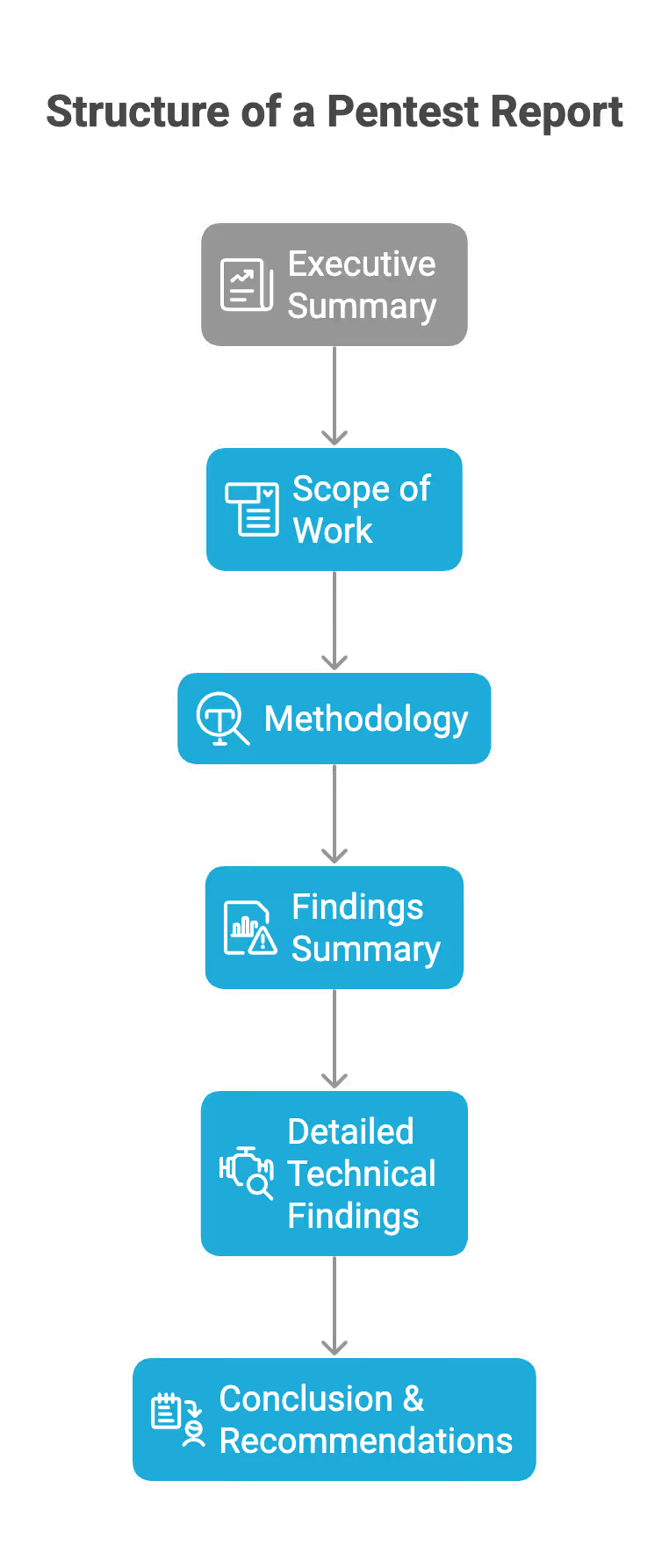
A professional pentest report is structured like a funnel. It starts broad for business readers and narrows down into deep technical specifics for engineers. Each report section is designed to address specific stakeholder needs, ensuring clarity and actionable insights for both technical and non-technical audiences.
Here are the essential components you should expect to see:
- Executive Summary: High-level overview for leadership, summarizing key risks and recommendations.
- Scope of Work: Defines the boundaries of the assessment, including which systems, applications, and data were tested. Attack targets, such as specific IP addresses or hostnames, are clearly defined to avoid unauthorized or unintended testing.
- Methodology: Describes the testing approach, tools, and frameworks used.
- Findings Summary: Lists discovered vulnerabilities and weaknesses. Severity ratings are used to categorize vulnerabilities by risk level, helping prioritize remediation efforts.
- Detailed Technical Findings: In-depth analysis of each issue, including evidence, impact, and remediation guidance.
- Conclusion & Recommendations: Actionable next steps and strategic advice for improving security posture.
The Executive Summary
This is the most important section for the founder. The executive summary provides a brief summary of the issues identified during the test, answering three questions:
- How secure are we overall?
- What are the biggest risks we face right now?
- What is the timeline for fixing them?
The Scope of Work
This section defines the boundaries of the test, including the attack targets such as specific IP addresses, hostnames, or web applications. It lists exactly what was tested (e.g., app.yourstartup.com) and, crucially, what was not tested.
- Why it matters: If you get hacked through a subsystem that was not in the scope, you need to know that the pentest did not cover that area.
The Findings Summary (Risk Table)
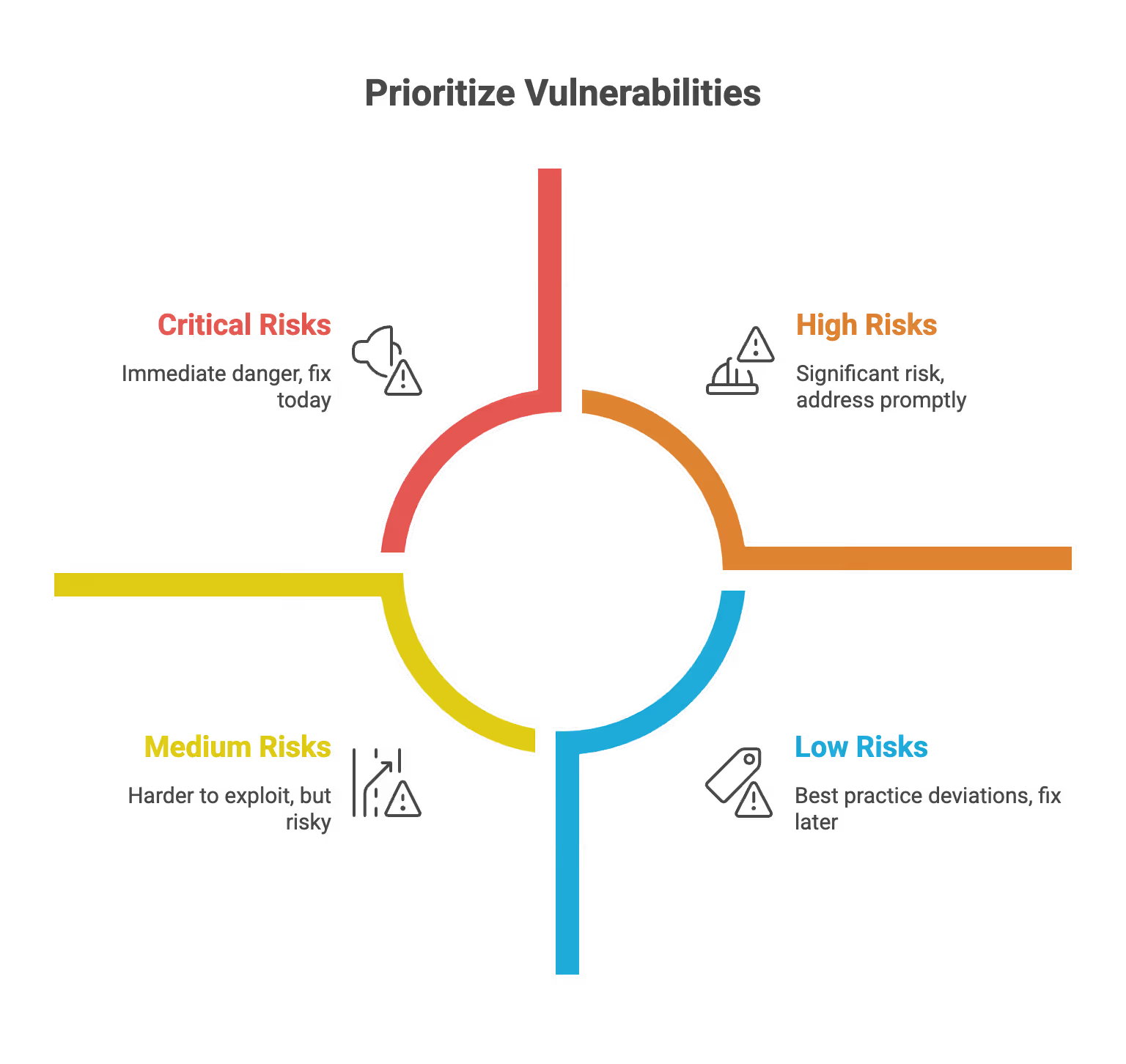
This is usually a graphical chart or table that categorizes vulnerabilities by severity. Each vulnerability is assigned a risk score to help prioritize remediation efforts based on its potential impact and likelihood.
- Critical: Immediate danger. Fix today.
- High: Significant risk. High risk issues should be addressed promptly to reduce exposure. Fix in the next sprint.
- Medium: Harder to exploit, but risky. Fix soon.
- Low/Informational: Best practice deviations. Fix when time permits.
Technical Findings (The "Meat")
This is the section for your developers. Each finding details the identified vulnerabilities and must include:
- Description: What the bug is.
- Impact: The potential impact of the vulnerability: what a hacker could do with it (e.g., “steal all user credit cards”) and how it could affect your organization’s security, operations, or data integrity.
- Proof of Concept (PoC): Step-by-step instructions or screenshots showing exactly how the tester exploited the bug.
- Remediation: Specific code snippets or configuration changes to fix the issue, along with remediation recommendations for addressing each vulnerability.
How to Read a Pentest Report (For Non-Techies)
You have received the PDF. It is 50 pages long. Do not panic. You do not need to understand every line of code to extract value from it. Plain language and visual aids included in the report can help non-technical readers quickly grasp key findings and understand complex security issues.
Follow this step-by-step process to digest the report effectively:
At the end of your review, remember that integrating the report findings into your security workflows ensures continuous improvement and helps your organization respond rapidly to vulnerabilities.
Step 1: Check the Dates and Scope
Verify that the test happened on the correct version of your application. If you released a major update the day after the test began, the report might already be outdated. Significant changes to your application, such as new features, architecture modifications, or major deployments, should trigger a new pentest assessment to ensure continued security and compliance.
Step 2: Read the Executive Summary Narrative
Look for the “tester’s voice.” Automated scanners produce generic summaries. Human testers write narratives. The executive summary should clearly highlight key findings and any critical information discovered during the test, helping stakeholders understand the most significant risks and prioritize remediation.
- Look for phrases like: “We were able to chain together three minor issues to gain admin access.”
- Why: This tells you about the logic flaws in your app, which are usually the most dangerous.
Step 3: Review the Risk Table
Focus immediately on Critical and High severity issues. Critical issues should be prioritized for immediate remediation, as they pose the highest threats to your organization and require urgent attention.
- Startup Reality Check: It is common to have a few Highs and Mediums in a first pentest. Do not fire your CTO. The goal is to identify them, not to have a perfect score on day one.
Step 4: Understand the CVSS Score
Most reports use the Common Vulnerability Scoring System (CVSS), which assigns a risk score from 0.0 to 10.0 to each bug. This risk score reflects the potential impact of each vulnerability, helping organizations understand the significance and consequences of security issues in their environment.
Tip: Do not just look at the number. Ask your lead developer: “Is this actually exploitable in our specific environment?” sometimes a “High” on paper is a “Low” in reality because of other compensating controls you have in place.
Step 5: Look at the Remediation Plan
Does the report just say “Fix the code”? Or does it link to specific libraries and documentation? Good reports educate your team so they do not make the same mistake twice. Effective remediation recommendations are essential for risk mitigation, providing clear, actionable steps that help your team address vulnerabilities and strengthen your overall security posture.
Types of Pentesting and Reporting Differences
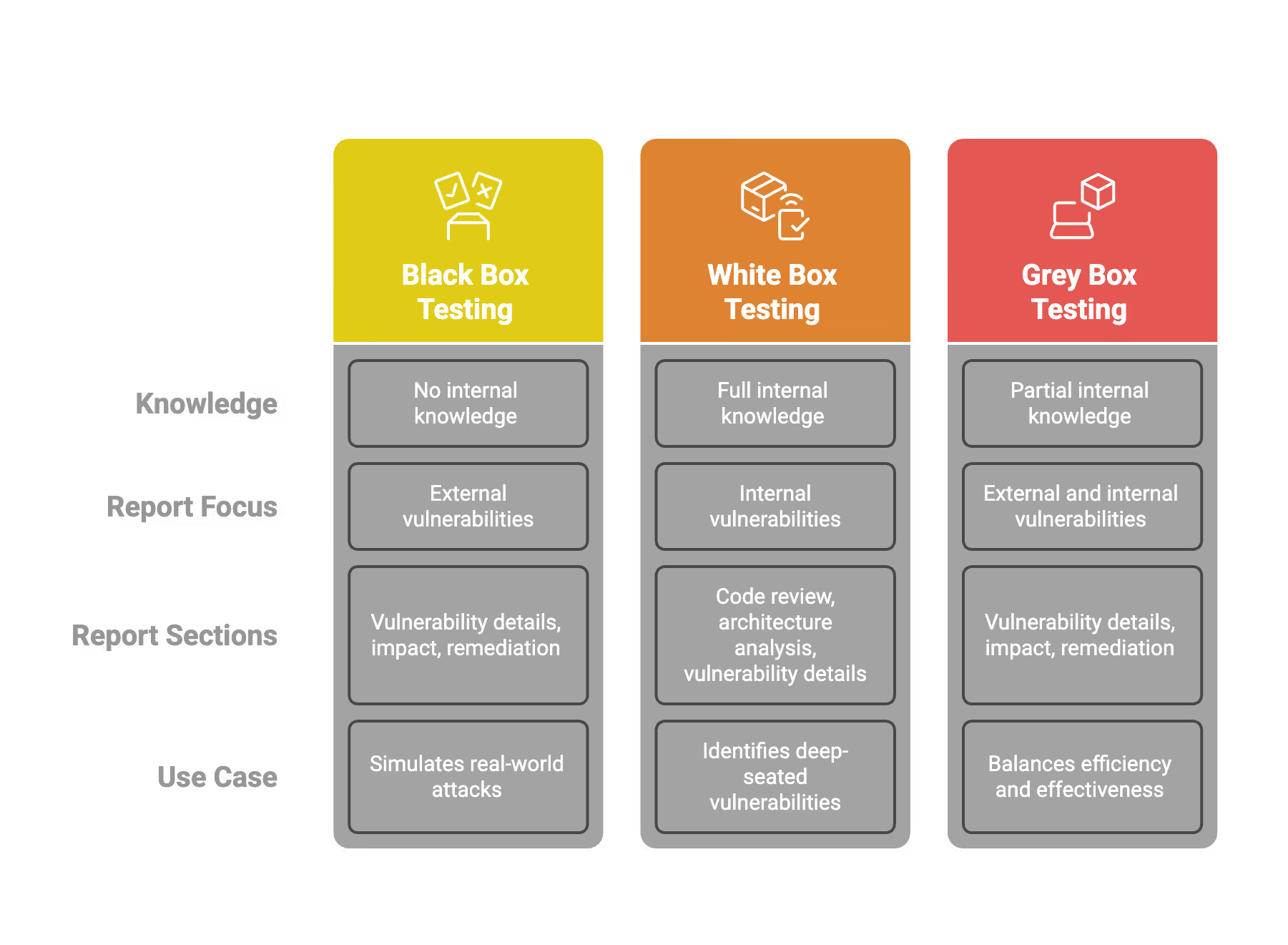
Not all pentests are created equal. The type of testing you buy dictates the type of report you get. Each type of test produces a different technical report, with varying report sections tailored to the specific testing approach. Understanding this prevents misalignment between your expectations and the deliverable.
Black Box Testing
- The Scenario: The tester mimics a real-world hacker with zero prior knowledge of your system. They attack from the outside in, specifically targeting externally exposed attack targets such as designated IP addresses or hostnames.
- The Report Focus: This report will focus heavily on external vulnerabilities, highlighting the identified vulnerabilities discovered during the test. It shows what a random attacker on the internet could see.
- Best For: Simulating a real cyberattack scenario.
White Box Testing
- The Scenario: The tester is given full access—source code, design documents, admin accounts, network diagrams, and other critical information.
- The Report Focus: This report is much more comprehensive. It will find “logic bugs” buried deep in the code that an external hacker might miss initially but would eventually find. It creates a longer, denser report.
- Best For: Maximum security assurance. This is often the best value for startups because it finds the most bugs per dollar spent.
Grey Box Testing
- The Scenario: A mix of both. The tester has user accounts but not source code.
- The Report Focus: Focuses on “Privilege Escalation”—can a standard user become an admin? Findings are integrated into existing security workflows to assess the potential impact of privilege escalation on the organization’s security and operations.
- Best For: Testing SaaS platforms where user roles are critical.
Best Practices for Startups
To get the most out of your pentest report, you need to manage the engagement correctly from the start. Working with experienced security professionals ensures that risk mitigation is prioritized throughout the process, helping your organization address vulnerabilities effectively and strengthen your overall security posture.
Define the "Letter of Attestation"
Startups often need to share proof of security with clients without sharing the full report (which contains sensitive details on how to hack you).
- The Fix: Ask your pentest provider to create a separate "Letter of Attestation" or "Executive Certificate." This is a one-page document confirming the test was done and that you are fixing the issues. You can safely share this with customers.
Require a Retest
The initial report is only half the battle. Once your developers fix the bugs, how do you know the fix worked?
- The Fix: Always negotiate a "Retest" or "Remediation Check" into the contract. The testers should review your fixes and issue an Updated Report showing that the vulnerabilities are now "Closed."
Use the Report for Developer Training
Do not just file the report away in Google Drive.
- The Fix: Hold a "Lunch and Learn" where your engineering team reviews the findings. If the report highlights a lot of "SQL Injection" flaws, that is a signal that your team needs training on safe database queries.
Scheduled Testing vs. Continuous Testing
- Scheduled: The traditional “once a year” test. Good for compliance.
- Continuous: Newer model where testing happens all year. This approach helps quickly address identified vulnerabilities and integrates with existing security workflows, making it easier to detect and respond to issues as part of your ongoing development process.
- Advice: For early-stage startups, a scheduled annual test is usually sufficient and more budget-friendly. As you scale, move to continuous.
Common Issues and Pitfalls to Avoid
Startups are vulnerable to low-quality vendors selling “pentests” that are actually just automated scans. Failing to identify critical issues or high risk issues in pentest reporting can leave organizations exposed to significant threats. Here is how to spot the difference and avoid bad reporting.
Pitfall 1: The "Zero Risk" Report
If a report comes back saying you have zero vulnerabilities, be suspicious. No software is perfect.
- What it means: The tester likely did not try hard enough, or the scope was too narrow. A legitimate pentest report should include a risk score for each finding; if every risk score is zero, that's a red flag and may indicate the assessment was not thorough.
- Action: Challenge the vendor. Ask for their testing logs or methodology.
Pitfall 2: The Automated Scan Disguise
Some vendors run a cheap software scanner (which you could do yourself for free) and put their logo on the PDF.
- How to spot it: The findings look generic. There are no screenshots of your specific app. The descriptions are copy-pasted from a database. Real pentest reports use plain language and visual aids to clearly communicate findings, making technical results accessible to all stakeholders.
- Action: Ensure your contract specifies “Manual Penetration Testing.”
Pitfall 3: False Positives
A “False Positive” is when the report claims there is a bug, but it is actually a harmless feature.
- The Issue: It wastes developer time investigating ghosts.
- The Solution: A good pentest firm manually verifies every finding to remove false positives before sending you the report, ensuring that only verified identified vulnerabilities are included in the final report.
Pitfall 4: Vague Remediation
“Update your software” is bad advice. “Update Apache Tomcat to version 9.0.4 to patch CVE-2023-XXXX” is good advice.
- The Issue: Vague instructions lead to incomplete fixes.
- The Solution: Reject reports that lack specific, actionable steps. Reports should provide clear remediation recommendations for each finding, outlining prioritized actions to address identified vulnerabilities.
Pitfall 5: Fear Mongering
Some reports exaggerate the risk of minor issues to justify the cost of the test.
- The Issue: It causes panic and derails your product roadmap.
- The Solution: Rely on the CVSS score, not the adjectives used in the text. Severity ratings and potential impact should be used to objectively assess each finding. If a bug requires physical access to your server room to exploit, it is not a “Critical” risk for a cloud startup.
SecureLeap Penetration Testing Services for Startups
At SecureLeap, we understand the unique challenges startups face when it comes to cybersecurity. Our penetration testing services are specifically designed to meet the needs of seed-to-Series B startups and SMBs, providing comprehensive security assessments that align with your growth stage and resource constraints.
Whether you are preparing for SOC 2, ISO 27001, HIPAA, or PCI DSS compliance, our expert team delivers actionable insights to help you identify vulnerabilities, strengthen your security posture, and protect your critical data and intellectual property.
Our startup-focused pentest service includes:
- Tailored testing scopes that prioritize your most critical assets, such as authentication systems, payment gateways, and APIs.
- Flexible engagement models that fit your budget and timeline, allowing you to start small and scale testing efforts as your company grows.
- Integration with compliance goals to support audit readiness and demonstrate due diligence to potential investors and enterprise clients.
- Detailed, easy-to-understand reports that highlight exploitable vulnerabilities along with clear remediation guidance.
- Ongoing support and consultation to help you plan future security improvements and maintain a security-first culture.
By partnering with SecureLeap, startups gain access to seasoned penetration testers who combine technical expertise with a deep understanding of startup environments. Our goal is to empower you with the confidence and security needed to accelerate your business growth without compromising on compliance or customer trust.
Ready to secure your startup’s future? Schedule a free consultation with SecureLeap today and take the first step towards a stronger, more resilient security posture.
FAQ Pentest Report
What is a pentest report?
A pentest report is a formal document provided by ethical hackers that details exploitable vulnerabilities found during a simulated cyberattack. It serves as a technical roadmap for engineering teams and a trust asset for stakeholders and customers.
What are the main sections of a penetration testing report?
A standard report includes an executive summary, scope of work, methodology, findings summary with risk ratings, and detailed technical remediation steps. These sections ensure both leadership and developers understand how to address security risks.
What does a CVSS score represent in security findings?
The Common Vulnerability Scoring System assigns a numerical value from 0.0 to 10.0 to help prioritize remediation efforts. A score from 9.0 to 10.0 is considered critical and typically indicates risks like remote code execution or massive data leaks.
How can a startup share pentest results with customers safely?
Startups should request a Letter of Attestation or Executive Certificate from their provider to share with clients. This one-page document confirms the test occurred and that issues are being fixed without revealing sensitive technical secrets.
Why is a pentest retest necessary?
A retest involves testers reviewing your security fixes to confirm they effectively closed the identified vulnerabilities. This process results in an updated report that proves your systems are secure to auditors and enterprise clients.
%20(55)%20(1).avif)

%20(51)%20(1).avif)
%20(46)%20(1).avif)