

What Are SOC 2 Password Requirements ?
Here’s what most compliance guides won’t tell you upfront: SOC 2 does not mandate specific password lengths or complexity rules. The AICPA Trust Services Criteria (the framework behind SOC 2) requires “appropriate logical access controls” under Common Criteria 6.1 through 6.8, but deliberately avoids prescribing exact numbers like “12 characters with 1 special character.”
This principle-based approach gives your organization flexibility, but it also means auditors expect your password controls to align with current industry best practices. In 2026, that means NIST SP 800-63B (Revision 4) serves as the de-facto reference standard for password security, with NIST CSF v2.0 providing broader risk context.
Key Takeaways
- SOC 2 requires passwords to meet “appropriate logical access controls” but doesn’t mandate specific numbers—NIST SP 800-63B fills this gap
- Focus on password length: Enforce a universal minimum of 15 characters for all accounts. This is the safest baseline that covers both Single-Factor and Multi-Factor scenarios under NIST standards.
- Eliminate forced password expiration and instead change passwords only when compromise is suspected
- Screen all new passwords against lists of compromised passwords to block weak passwords
- Implement multi factor authentication for all privileged and remote access as a mandatory control
- Document your password policy formally and ensure technical configurations match
- Map controls to both SOC 2 CC6.x and NIST frameworks for audit-ready evidence
Strong password policies implemented correctly protect your resources, demonstrate security maturity to enterprise customers, and ensure compliance across multiple frameworks. For startups, this represents one of the highest-impact, lowest-cost security investments you can make.

Password Policy: A Quick-Start Baseline Guide
So what should you actually implement? Here’s our quick-start baseline for SOC 2-ready password settings:
- Minimum length of 15+ characters for ALL user accounts. [Note: NIST SP 800-63B-4 mandates 15 characters for single-factor accounts. By adopting 15 as your universal baseline, you ensure compliance for every account, regardless of MFA status.]
- No mandatory complexity gimmicks if using long passwords or passphrases—allow all characters including spaces
- No forced periodic resets; change passwords only on suspicion or evidence of compromise
- Check all new passwords against known-breached password lists (like Have I Been Pwned)
- Enforce multi factor authentication for all admin accounts and all remote access; strongly encourage for all users
- Implement rate-limiting or CAPTCHA challenges after failed attempts (preferred over hard lockouts).
Remember: strong password policies aren’t just about passing an audit. For SaaS, fintech, and healthtech startups, they protect sensitive data and build the trust that closes enterprise deals.
How SOC 2 Treats Passwords and Access Controls
SOC 2 is built on the AICPA Trust Services Criteria (TSC), with Security (the Common Criteria) almost always in scope. For most SaaS providers, Availability, Confidentiality, and Privacy are also included based on the nature of the service.
The Common Criteria most relevant to passwords and authentication are:
- CC6.1: Logical access security software, infrastructure, and architectures are implemented to support restrictions over access. This is the primary criteria covering authentication settings (passwords, MFA) and logical access restrictions.
- CC6.2: Prior to issuing system credentials, the entity registers and authorizes new internal and external users. This ensures employees and contractors receive proper access provisioning.
- CC6.3: Adds, changes, and removals for logical access (joiners, movers, leavers) are reviewed and approved. Access modifications require formal approval processes.
- CC6.4: Access is modified or removed when employment or roles change. This protects against former employees retaining inappropriate access.
SOC 2 auditors typically expect three things from your organization:
- A documented password policy that addresses password complexity, expiration, and password reuse
- Evidence that technical configurations (IdP, SSO, local OS policies) match that documented policy
- Monitoring of failed logins, lockouts, and admin access security events
Although SOC 2 itself doesn’t name NIST explicitly, many auditors use NIST SP 800-63B and NIST CSF as benchmarks for what constitutes “reasonable” password controls. This is why aligning with nist guidelines gives you a defensible position during your audit.
NIST-Based Password Requirements You Can Safely Use for SOC 2
NIST SP 800-63 provides the detailed “how” that SOC 2’s principle-based criteria leave open. Here are the key recommendations as of August 2025 (Revision 4):

Password Length and Structure:
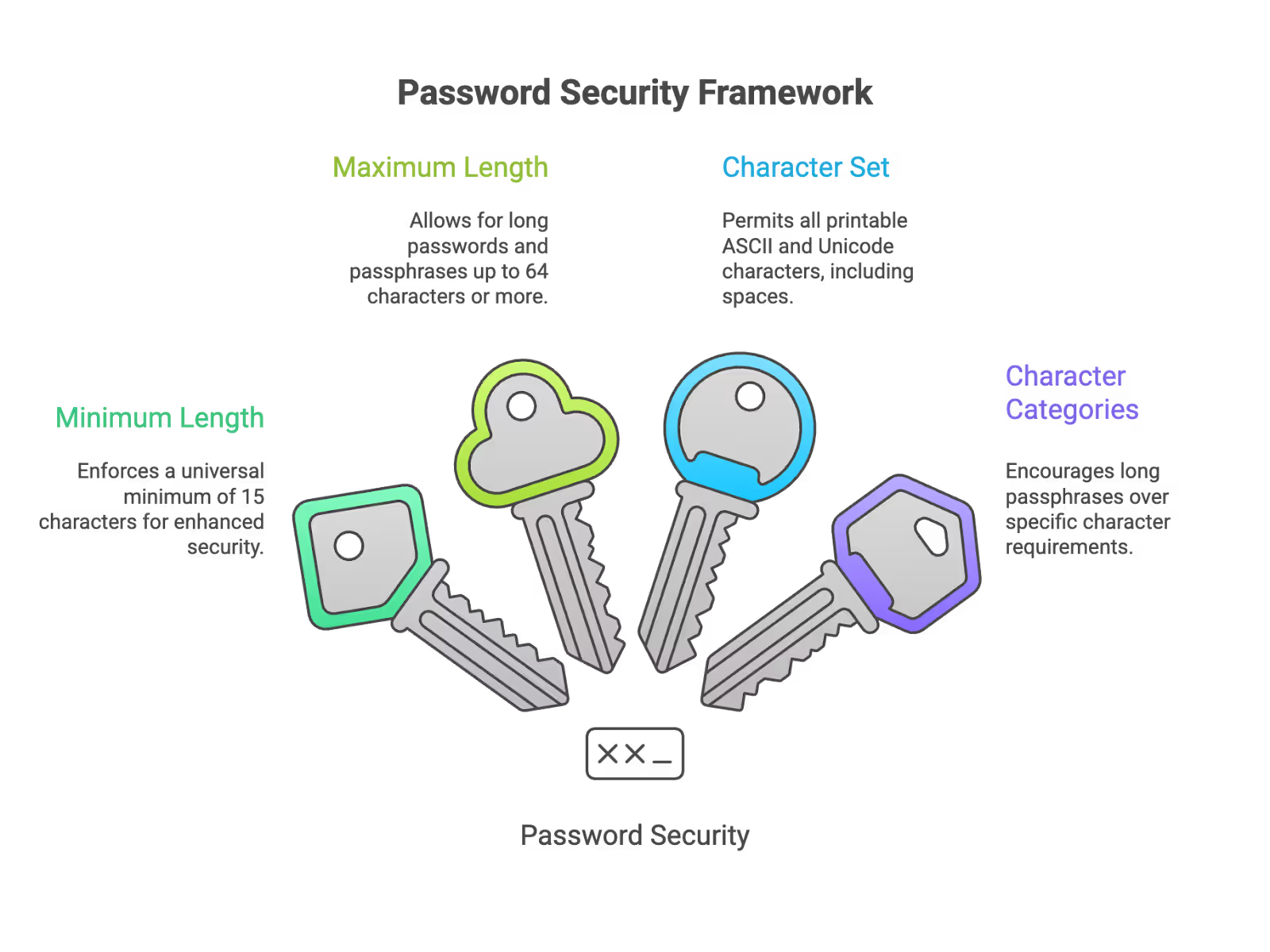
- Minimum password length: Set a universal minimum of 15 characters. While NIST allows shorter passwords (8 chars) if MFA is verified, it mandates 15 characters for any account relying on Single-Factor authentication. Setting a flat 15-character rule simplifies compliance and covers all scenarios.
- Maximum length should be 64 characters or more to allow for long passwords and passphrases
- Allow all printable ASCII characters and Unicode (including spaces)—avoid arbitrary character restrictions
- Do not require users to include specific character categories (uppercase letters, lowercase letters, numbers, special characters) if you encourage long passphrases
Password Lifecycle:
- Do not force periodic password expiration policies unless there is evidence or strong suspicion of compromise
- Screen passwords against lists of previously compromised passwords and commonly used passwords (“123456”, “Password!”, company name, username)
- Throttle online authentication attempts (rate-limiting) rather than immediate hard lockouts to prevent Denial of Service (DoS) attacks against your own users.
How This Aligns with SOC 2:
- NIST rules give the “how” for CC6.x criteria; using them demonstrates your controls are “industry standard”
- For each major system (SSO/IdP, production infrastructure, code repos, VPN), apply consistent NIST-style password and MFA policies
- NIST SP 800-63-4 is the new version since August 2025—track updates but implement current nist’s recommendations immediately
NIST Authentication Assurance Levels (AAL):
- AAL1: Password-only can be acceptable for low-risk account types
- AAL2/AAL3: Require factor authentication (typically what auditors expect for privileged and remote access in SOC 2 environments)
Concrete SOC 2 Password & Authentication Settings (By System)
Generic password guidelines are helpful, but you need specific settings for the systems you actually use. Here’s what to configure in 2026:
For SSO / Identity Providers (Okta, Azure AD, Google Workspace):
- Set global minimum password length to at least 15 characters for ALL users (workforce and admins). This ensures compliance regardless of MFA status.
- Allow passphrases with spaces; no arbitrary bans on special characters
- Disable frequent forced password expiration; enforce reset on suspicion of compromise or after high-risk security events (e.g., phishing incident)
Tip: If your auditor asks why you don't rotate passwords every 90 days, provide your risk assessment citing NIST 800-63B guidelines.
- Enforce MFA for:
- All admin roles
- All remote access (including contractor accounts)
- All access to production environments and cloud consoles (AWS, GCP, Azure)
- Configure rate-limiting or CAPTCHA after 5-10 failed attempts. If using hard lockouts, ensure they auto-unlock after a reasonable period (e.g., 30 minutes) to prevent DoS.
- Enable risk-based sign-in policies where available (impossible travel, unknown device, unusual location)
For Operating Systems (Windows, macOS, Linux):
- Join endpoints to a central directory (Entra ID, Okta, JumpCloud) where possible; manage password policy there
- Enforce non-blank passwords on all local accounts; disable shared local admin passwords to eliminate easy to guess passwords scenarios
- Require full-disk encryption (BitLocker/FileVault/LUKS) with strong passphrases and stored recovery-key protection
For Developer & Production Systems (GitHub/GitLab, AWS/GCP/Azure consoles, CI/CD, Kubernetes):
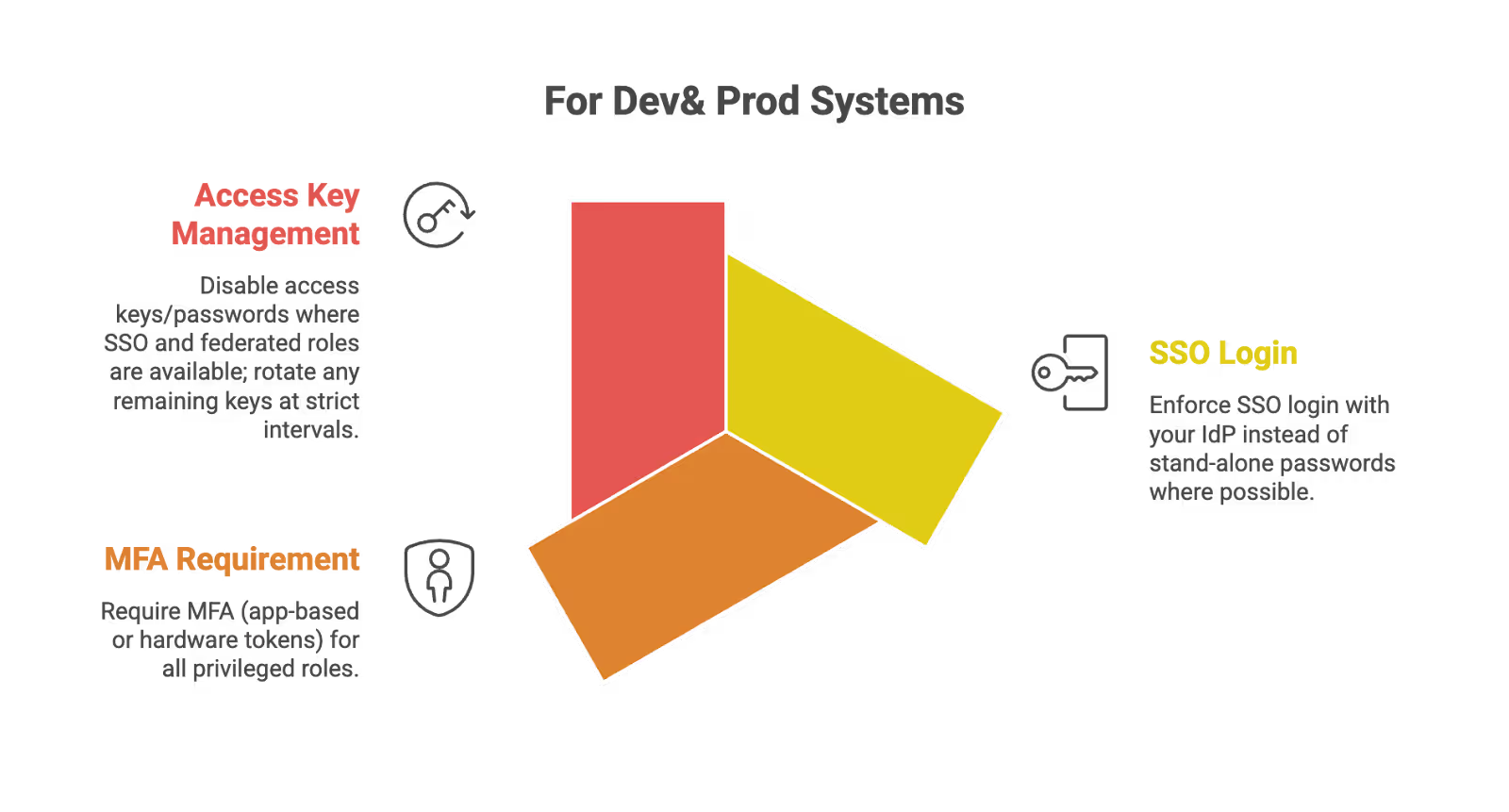
- Enforce SSO login with your IdP instead of stand-alone passwords where possible
- Require MFA (app-based or hardware tokens) for all privileged roles (Org Owners, Repo Admins, Cloud Admins)
- Disable access keys/passwords where SSO and federated roles are available; rotate any remaining keys at strict intervals
For VPNs and Remote Access:
- Disallow password-only VPN access; require MFA and, where possible, device posture checks (managed device, disk encryption, up-to-date OS)
- Set short session timeouts for privileged VPN profiles, with reauthentication using MFA
Why Strong Password Requirements Matter for SOC 2 (Security, Risk & Trust)
Understanding the “why” behind password requirements helps you make better security decisions and communicate value to stakeholders. Here’s what’s at stake in 2025-2026:
Data Breach Trends:
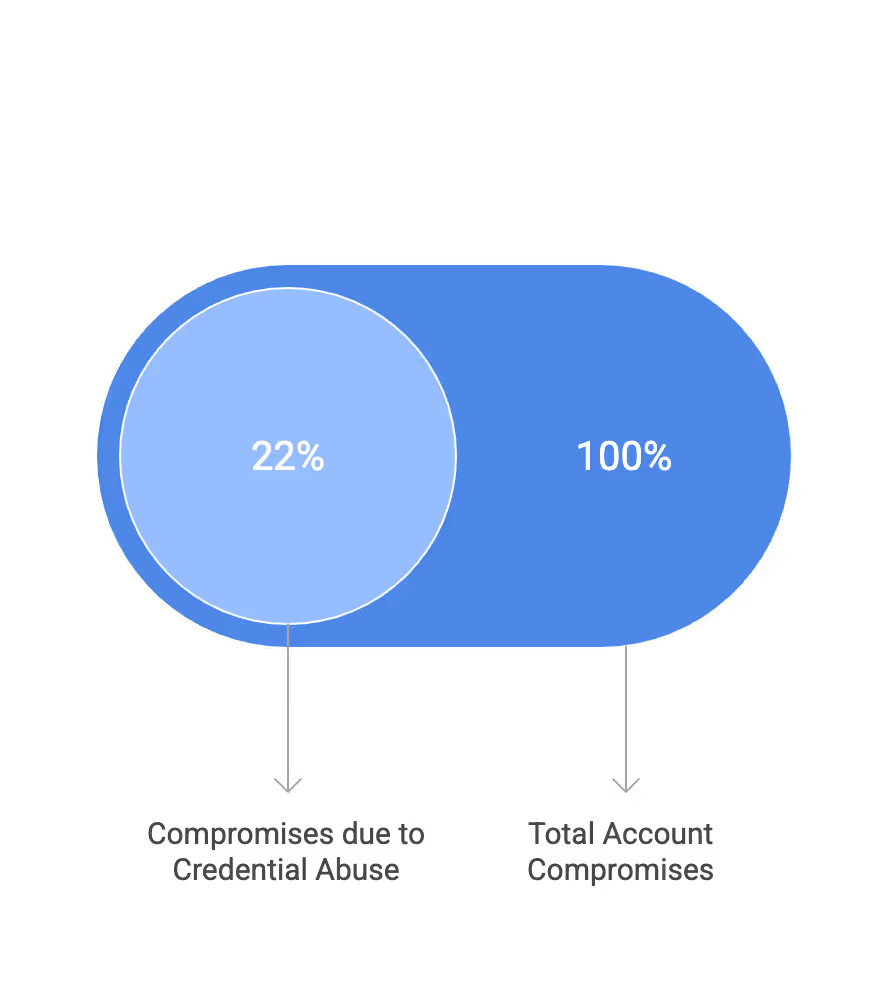
The Verizon DBIR 2025 consistently shows that credential theft and misuse remain top causes of breaches. Weak passwords and password reuse (Credential abuse) contributed to 22% of account compromises reported. Startup environments are especially vulnerable due to rapid growth, many SaaS tools across multiple accounts, and high contractor churn.
Using the same password across other websites and business accounts creates a weak link that attackers exploit through credential stuffing. A poorly chosen password or stolen credentials from one service can compromise your entire organization. The most effective way to prevent this without frustrating your team is by rolling out a dedicated credential vault. If your engineering or security team prefers to retain full control over its infrastructure, check out the Core Labs Vaultwarden Guide to learn how to self-host a SOC 2-compliant password manager.
Regulatory and Contractual Pressure:
Password strength and multifactor authentication directly support SOC 2 Security criteria while also reinforcing Confidentiality and Availability. There’s significant overlap with:
- HIPAA (for healthtech) requiring access controls for protected health information
- PCI DSS (for fintech handling card data) with its specific password requirements
- GDPR (data minimization and protection of processing) for companies handling EU data
Enterprise customers increasingly include SOC 2-like language in security questionnaires and MSAs, such as “must enforce MFA for all access to customer data.” Passing these reviews requires demonstrable password security controls.
Incident Response and Forensics:
Strong password and MFA policies enable meaningful alerts: failed login peaks, impossible travel, anomalous device sign-ins. Proper lockout, throttling, and centralized logging make it easier to demonstrate to auditors that incidents would be detected and contained. This monitoring capability is an important aspect of your overall security posture.
Trust and Sales Velocity:
Tie strong password policies to faster security reviews and shorter sales cycles with large B2B customers. Demonstrating NIST-aligned password controls in a SOC 2 report or security questionnaire is now table stakes for SaaS, fintech, and healthtech vendors. Your password policy serves as the first line of defense that enterprise buyers evaluate.
SecureLeap positions password and authentication hardening as one of the highest ROI appropriate steps for early-stage companies pursuing SOC 2 and ISO 27001 simultaneously.
Sample SOC 2-Ready Password & Authentication Policy (NIST-Aligned)
Below is a good starting point for password policy at startups.This example demonstrates how to document your password guidelines in formal policy language that auditors expect.

Password and Authentication Policy
Version: 1.0
Effective Date: [Date]
Last Reviewed: [Date]
Policy Owner: CISO / Security Lead
1. Purpose and Scope
This policy establishes password and authentication requirements to protect company systems and customer data. It applies to all employees, contractors, interns, and third parties with access to corporate systems or customer data. This policy covers all authentication methods for SaaS apps, infrastructure, endpoints, and internal tools.
2. Roles and Responsibilities
- CISO / Security Lead (or vCISO via SecureLeap) owns and approves this policy
- IT / DevOps implements technical controls in IdP, endpoints, and cloud platforms
- People Ops ensures onboarding/offboarding includes account provisioning and deprovisioning aligned with CC6.x criteria
3. Password Creation Requirements
All users must create unique passwords meeting the following criteria:
- Minimum Length: 15 characters for all user accounts.
- Use a 4+ word passphrase format (example: “blue-train-iris-bridge-secure”).
- Complexity: No requirement to include specific character types, but all printable characters (including spaces) are allowed.
New passwords must not:
- Appear in a list of top 100,000 most common passwords
- Be found in current compromised passwords databases (e.g., Have I Been Pwned feeds via technical tooling)
- Contain the user’s name, username, or company name
- Be shared with family members or co workers
Passwords must meet these complexity requirements to ensure compliance and protect against common attacks.
4. Password Lifecycle
- Passwords are changed immediately upon suspected compromise, phishing, or confirmed credential leak
- No blanket 60/90-day expiration; exceptions documented for systems that cannot support better controls
- Password reuse across different internal systems is discouraged; SSO and password managers are preferred
- Users must not use the same password across multiple business and personal accounts
5. Multi-Factor Authentication Requirements
Biometric verification, one time password apps, push notifications, and hardware tokens provide additional protection layers beyond passwords.
MFA is mandatory for:
- Access to production systems (cloud providers, Kubernetes, CI/CD)
- Access to admin consoles (SSO/IdP, MDM, HRIS, finance systems)
- Remote access (VPN, bastion hosts, remote desktops)
Accepted MFA methods prioritize phishing-resistant options:
- FIDO2/WebAuthn security keys where feasible
- Authenticator apps or push-based approval with protections against MFA fatigue
- Avoid SMS MFA for admins except as a backup, due to SIM-swapping risk
6. Account Lockout and Monitoring
- Implement progressive throttling (increasing delay between attempts) or CAPTCHA challenges after 10 failed attempts.
- If a hard lockout is enforced, set the lockout duration to 30 minutes (to prevent Denial-of-Service against valid users) or require helpdesk intervention.
- Log all authentication events to a centralized logging system or SIEM with alerts on:
- Unusual failed login bursts
- Logins from new countries or TOR exit nodes
- Multiple failed attempts across several accounts from one IP (possible credential stuffing)
These security precautions ensure rapid detection of unauthorized access attempts.
7. Password Storage and Management
- Prohibit storing passwords in plain text, spreadsheets, personal note apps, or shared documents
- Mandate use of a company-approved password manager (e.g., 1Password, Bitwarden Enterprise) for all non-SSO credentials via secure electronic communication channels
- Require unique passwords for each external SaaS account not integrated with SSO
- All passwords stored in systems must use strong encryption
8. User Awareness and Training
- Include NIST-aligned password and MFA guidance in new-hire security training (within first 30 days)
- Run short annual refreshers with real-world examples of credential stuffing, phishing, and MFA fatigue attacks.
- Train employees to recognize and report suspicious authentication requests
9. Policy Review and Maintenance
- Review at least annually or when there are major NIST or SOC 2 guidance changes
- Document changes and maintain version history to present during SOC 2 and ISO 27001 audits
- Track security forms and other forms of policy attestation
Integrating SOC 2 Password Requirements with NIST & NIST CSF
The real power of NIST alignment comes from creating a unified security program that satisfies multiple frameworks simultaneously. When you map password and authentication controls to NIST frameworks, you build a foundation that scales with your compliance needs.

Mapping Password Controls to NIST Frameworks:
- NIST SP 800-63B: Detailed requirements for digital identity guidelines, authentication, password length, blacklist checks, and MFA. This is your primary reference for the fourth revision of password best practices.
- NIST 800-53 controls (e.g., IA-2, IA-5) provide another mapping that many auditors recognize for computer security and access control
How This Mapping Helps Your Organization:
- Gives auditors a clear rationale for why your password settings are “reasonable and appropriate” rather than arbitrary
- Simplifies pursuing SOC 2, ISO 27001, and future frameworks (e.g., HITRUST) using the same underlying controls
- Reduces audit preparation time by maintaining consistent evidence across frameworks
Early-stage startups benefit tremendously from “designing once, complying many times.” Implementing NIST-aligned password and authentication controls now avoids costly rework when adding new frameworks later. This front line investment in security pays dividends across your entire compliance journey.
FAQ about SOC2 Password Policy
What is the recommended password length for SOC 2?
SOC 2 does not mandate specific password lengths, but using NIST standards as a reference is the current best practice. Implementing a 15-character minimum helps satisfy auditor expectations for logical access controls.
Is Multi-Factor Authentication required for SOC 2 compliance?
SOC 2 does not explicitly mandate MFA, but it is a standard market expectation for securing access today. Auditors typically look for MFA on administrative roles and remote access to demonstrate appropriate security practices.
Does SOC 2 require forced password expiration?
No, modern guidance suggests replacing forced expiration with rotation only upon suspected compromise. This approach aligns with NIST standards and avoids the security weakness of predictable password patterns.
What are the password complexity rules for SOC 2?
The framework does not define specific complexity rules and instead requires appropriate logical access controls. Best practices favor long passphrases without arbitrary character restrictions over complex short passwords.
How should I document password policies for SOC 2?
You must create a formal policy document that outlines your specific settings for length, lifecycle, and access. Auditors will verify that your actual technical configurations match this written policy.
Final Take: Get SOC 2 Certification Fast and Affordable with Secureleap
Achieving SOC 2 certification is a critical step in demonstrating your commitment to data security and winning the trust of enterprise customers. While the process can seem complex and costly, partnering with the right experts can make all the difference.
Secureleap specializes in helping organizations obtain SOC 2 certification quickly and at a very competitive price. With tailored services designed to streamline your audit process, reduce preparation time, and manage costs effectively, Secureleap ensures you get a credible, customer-trusted SOC 2 report without unnecessary delays or expenses.
Whether you're a startup or a growing mid-market company, Secureleap’s expertise and efficient approach can help you navigate the compliance journey smoothly, so you can focus on what matters most—growing your business with confidence.
Contact Secureleap today to learn how we can support your SOC 2 compliance needs and accelerate your path to certification.
%20(49)%20(1).avif)

%20(33)%20(2).avif)
%20(17)%20(1).avif)